Using Wealtie: How to set category budgets in Wealtie inside your monthly limit
To set category budgets in Wealtie, give some categories their own share of your monthly limit, like 400 for groceries out of 2,000. Each share fills on its own, and anything you don't allocate still counts toward the total.
 By Wealtie Team · 3 min read
Key takeaways
- You can give chosen categories their own share of your monthly budget limit.
- Anything you don't allocate still counts toward the whole limit.
- Wealtie won't accept shares that add up to more than the limit.
- A share turns red only when it goes past its amount, and spending exactly the share is still yellow.
How do you set category budgets in Wealtie?
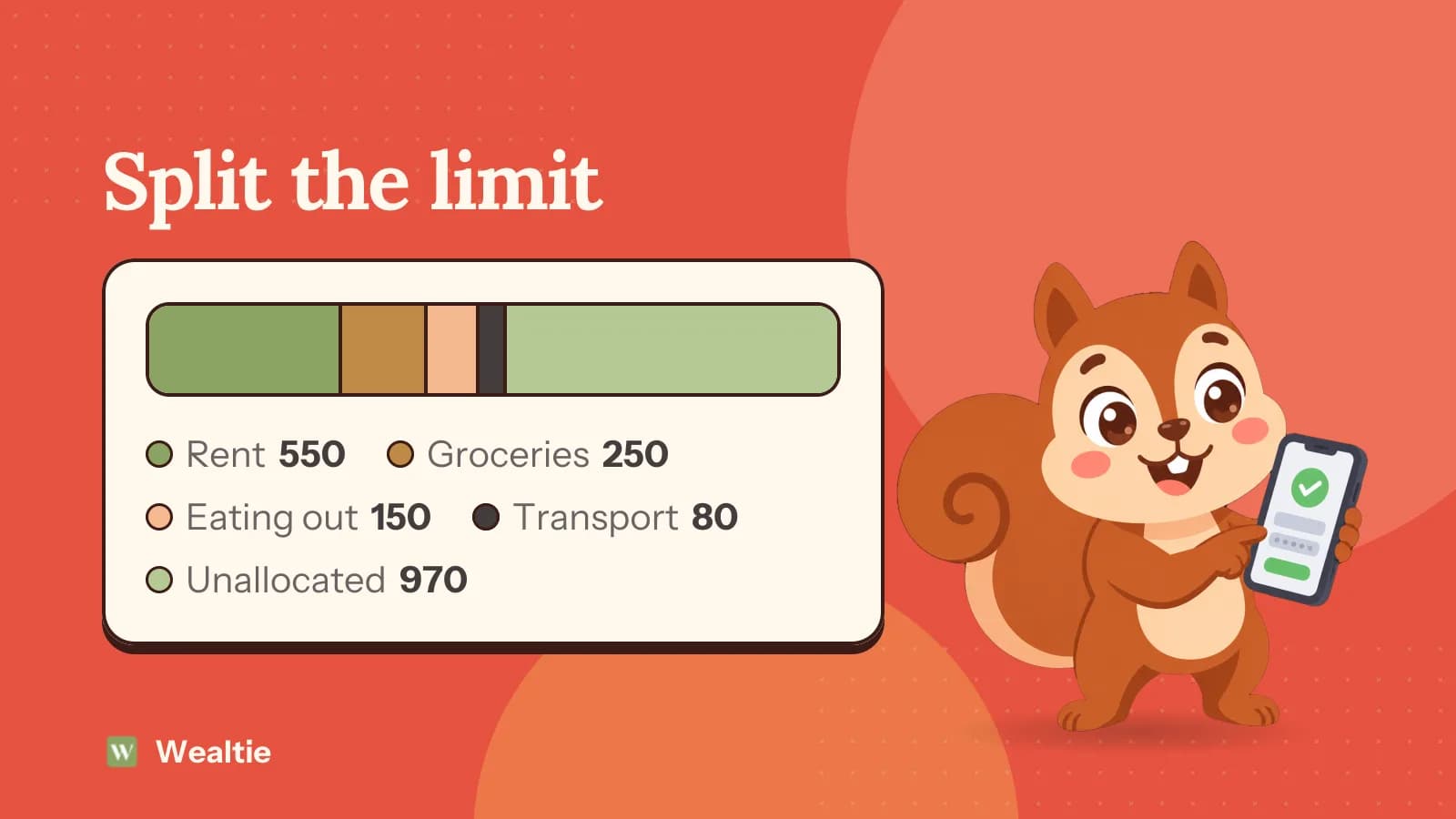
Set your monthly limit first, then give some categories their own share of it. Say your limit is 2,000. You could give Rent 550, Groceries 250, Eating Out 150 and Transport 80. Each share fills up separately as you spend.
You choose which categories get a share. Anything you don't allocate still counts toward the whole 2,000, so nothing slips through. The category split is on the Free plan.
Which categories should get a share?
The ones you want to watch or that tend to run over. Here's the example above, in round numbers that work in any currency:
| Category | Share |
|---|---|
| Rent | 550 |
| Groceries | 250 |
| Eating Out | 150 |
| Transport | 80 |
| Allocated | 1,030 |
| Unallocated, still counted | 970 |
| Monthly limit | 2,000 |
Look at the shares once a week. It takes a minute and shows which category is running fast while there's still time to change it. Fixed costs like rent are worth including so the share shows they've been paid. Variable ones, like eating out, are where a share earns its place, because that's where spending drifts.
You don't need to allocate everything. Four or five shares are usually enough, and the rest of the limit covers everything else. If you're new to this, start with three and add more once they're useful.
Leave savings out of the shares. Moving money to a savings account is a transfer, and transfers don't count against the budget, so savings don't need a slice of the limit.
What happens if the shares add up to more than the limit?
Wealtie refuses it. The shares can't add up to more than the total, so you can't accidentally plan a month that's bigger than your budget. If you want to give one category more, take it from another or raise the limit.
What do the colours mean?
Red means a share has gone over, not that it's close. Rent at exactly 550 of 550 is still yellow. Transport at 96 of 80 turns red, with a warning, because it's the one that went past.
So a yellow share at its limit is fine. A red one is the one to look at, and the rest of the month needs to make up for it somewhere. When a share goes red, decide whether to take room from another share or accept less slack elsewhere. Moving room between shares is better than ignoring it until the month ends.
How do category budgets work with Budget Health?
Budget Health looks at the whole limit. It compares how much of the limit you've used with how much of the month has passed, and warns you mid-month if your pace would take you over. The shares then show you which category is behind it.
If the whole budget is healthy but one share is red, you're still on track overall. Treat it as a prompt to rebalance, not a crisis. Together they answer two questions: am I on pace overall, and if not, where's it coming from? Budget Health explained goes into the warning.
How do you pick the amounts?
From your last two or three months of spending. Look at what each category came to, and set the share a little below if you want to cut back, or at the same level if you're just tracking. A share far below what you usually spend tends to go red in the first week and stop being useful.
You'll know rent and bills to the cent, so set those shares exactly. For variable categories, round to a figure you'll remember, like 250, so you can check it in your head. Adjust after a month. If a share is always far under, lower it and give the room to a category that runs over. How to make a budget walks through choosing amounts, and the 50/30/20 rule gives a starting split.
Does editing a share reset anything?
Editing a goal doesn't touch its streak. The count only moves when a period closes, so you can adjust shares mid-month without losing your run. Budget streaks explains how the count works.
Can category budgets run on other periods?
On Free, the budget is monthly. On Pro, budgets and income goals can run daily, weekly, monthly, quarterly or yearly instead, and the category shares split whichever limit you've set.
The full list of what's included is on the budget tracker page, and setting up categories in Wealtie helps you choose which categories to have in the first place.
Questions people ask
Yes. You can give chosen categories their own share of your monthly limit, and each share fills up separately. It's on the Free plan.
It still counts toward your whole monthly limit, so nothing slips through.
No. Wealtie refuses a split that adds up to more than the total.
Because spending in that category has gone past its share. A category at exactly its share stays yellow.
This article is general information, not financial, tax or legal advice. Your situation is your own; check the numbers that apply to you before you act on them.