Budgeting: Does working from home save money? What you save and what it costs
Does working from home save money? Usually yes, because you save on commuting, lunches and work clothes, though extra heating, electricity and snacks at home eat into the savings.
 By Wealtie Team · 3 min read
Key takeaways
- Working from home usually saves money on commuting, lunches and work clothes.
- It adds costs at home, mainly heating, electricity and snacks.
- In a worked example, someone saves 250 a month and spends 80 more, so they're 170 ahead.
- Track both sides for a month to see your own balance.
Does working from home save money?
For most people, yes. The biggest savings come from not commuting: no train or bus fares, less fuel, less parking and less wear on a car. You also stop buying lunches and coffees near the office, and you need fewer work clothes. On the other side, you heat and light your home during the day, run a laptop and a screen, and probably snack more. Whether you come out ahead depends on how far you travelled, how you got there and how cold your home gets in winter.
The good news is that you can work out your own answer with a few numbers. Add up what you no longer spend, add up what you now spend at home, and compare the two.
What do you save by working from home?
The main savings fall into a few groups.
Commuting
Fares, fuel, parking and tolls are usually the largest item. For someone driving or taking a train every day, this alone can be a big monthly figure. How to cut commuting costs covers the days you still go in.
Food and coffee
Lunches, coffees and after-work drinks bought near the office add up quickly. Eating at home costs less, even if you buy a few nicer ingredients. Bring lunch to work savings shows how much a bought lunch costs over a year.
Clothes and other costs
You need fewer work clothes, less dry cleaning and fewer haircuts timed for meetings. Some people also save on childcare, since there's no commute to cover at either end of the day.
What does working from home cost?
Working from home moves some costs onto your own bills.
Heating and electricity
Heating an empty home is cheap. Heating it while you sit still for eight hours isn't. In winter, this is the biggest extra cost. Heating the room you work in, rather than the whole home, and wearing an extra layer keep it down. How to save money on heating has more ideas.
Snacks and drinks
The kitchen is a few steps away, and many people find they eat more during the day. It's a small cost each day that adds up over a month.
Equipment
A desk, chair, screen and a better internet connection are often one-off costs. The home office budget covers setting one up without overspending. Some employers pay towards equipment or running costs, and in some countries you can claim tax relief, so check what applies to you.
How much can working from home save?
Here's a worked example for someone who used to take the train to an office five days a week, in round numbers that work in any currency:
| Item | Each month |
|---|---|
| Commuting saved | 180 |
| Lunches and coffee saved | 70 |
| Extra heating and power | -50 |
| Extra snacks at home | -30 |
| Ahead by | 170 |
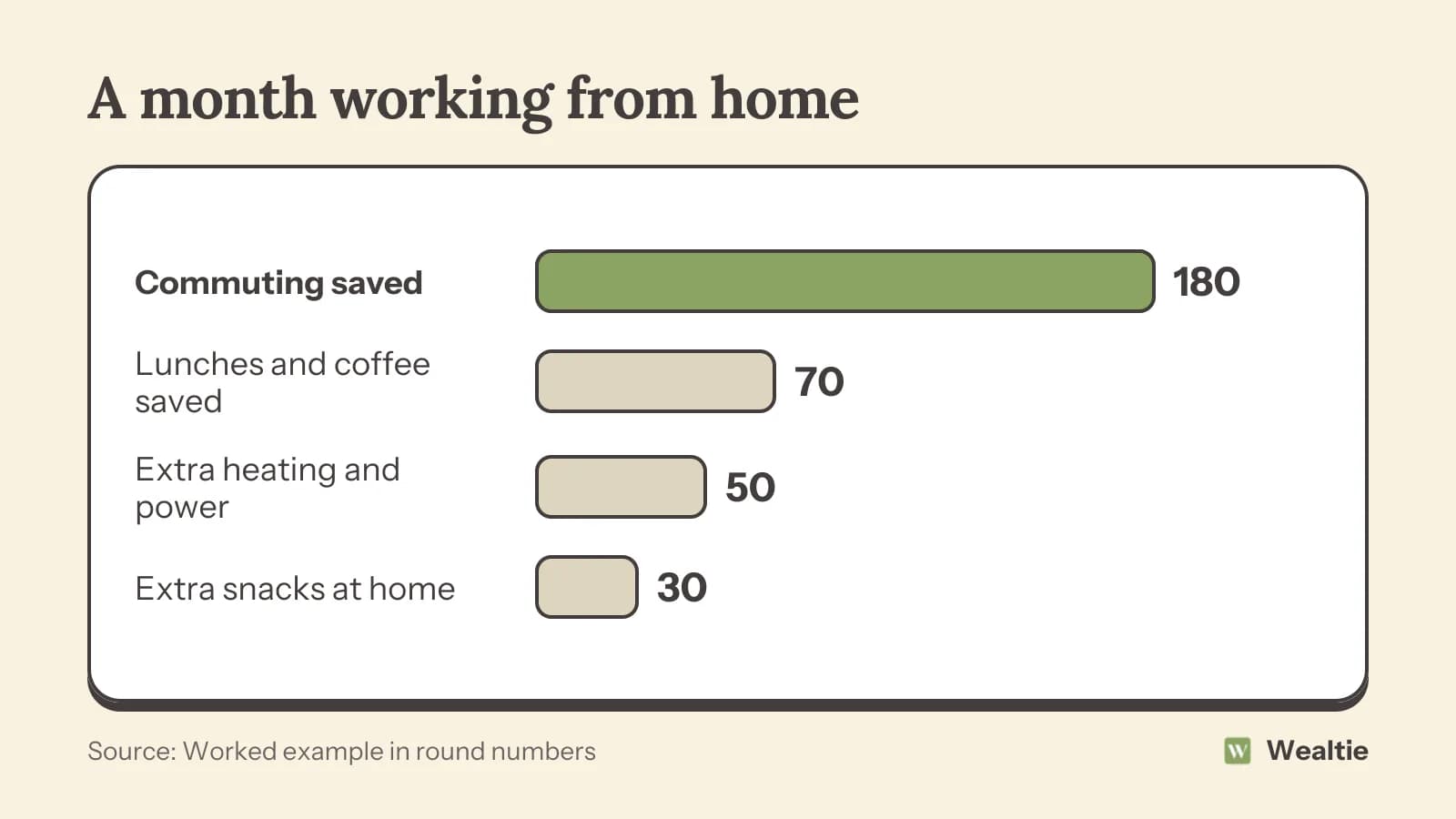
Over a year, that's about 2,000 more in their pocket. Your own numbers could be much bigger or smaller. A long, expensive commute makes the savings larger. A short walk to work and a cold, draughty home can wipe them out in winter.
What about hybrid working?
If you work from home some days and go in on others, you get part of the saving. Someone home three days a week saves a bit more than half of what a full-time home worker saves on commuting and lunches, while their home costs rise less too. Some season tickets stop being worth it once you travel fewer days, so check whether paying per journey works out cheaper.
Why does the saving sometimes disappear?
Money that stops going on fares and lunches doesn't automatically end up saved. It tends to drift into online orders, takeaways and treats bought out of boredom. If you want the saving to show up, decide where it goes: move it to savings on payday, or put it towards a goal. Otherwise it gets spent without you noticing.
It also helps to watch the extra home costs through the year. Energy bills rise in winter, and a monthly average can hide a few expensive months. A summer month at home might cost almost nothing extra, while a cold January month could eat most of the saving.
How do you track working from home costs in Wealtie?
Put the extra home costs, like snacks and higher bills, in their own expense categories, and set a monthly budget so you can see whether working from home is costing more than you expected. Add regular bills as recurring transactions, so they log themselves on their date. Comparing a month in the office with a month at home shows your own answer.
Questions people ask
Usually yes. You save on commuting, lunches and work clothes, which often outweighs the extra heating, electricity and snacks at home.
In a worked example, someone saves 250 a month and spends 80 more at home, so they're about 170 ahead each month.
Mainly heating, electricity, snacks and drinks, plus one-off equipment like a desk, chair and screen.
Move the money you no longer spend on commuting and lunches into savings on payday, so it doesn't drift into other spending.
This article is general information, not financial, tax or legal advice. Your situation is your own; check the numbers that apply to you before you act on them.