Saving: Standby power cost: what devices on standby add up to
Standby power cost is small per device but adds up across a home full of TVs, consoles, speakers and chargers. In a worked example, a household's devices on standby cost about 60 a year.
 By Wealtie Team · 4 min read
Key takeaways
- Standby power cost is small per device but adds up across a home.
- Games consoles, TVs and computers are often the biggest standby users.
- Switching off at the wall or using smart plugs cuts standby use.
- Some devices, like fridges and routers, should stay on.
What is standby power cost?
Many devices keep using electricity when they're switched off with a remote or left in sleep mode. TVs, games consoles, set-top boxes, computers, printers, speakers and kitchen gadgets with clocks all draw a small amount of power while waiting to be turned back on. This is sometimes called standby power or vampire power. Each device uses very little, but across a whole home, standby power cost adds up over a year.
Here's a worked example of a household's devices on standby for a year, at an electricity price of 0.30 per unit, in round numbers that work in any currency:
| Device | Yearly standby cost |
|---|---|
| TV, soundbar and streaming box | 18 |
| Games console | 15 |
| Computer and printer | 10 |
| Microwave, oven clock and coffee machine | 9 |
| Chargers and speakers | 8 |
| Total | 60 |
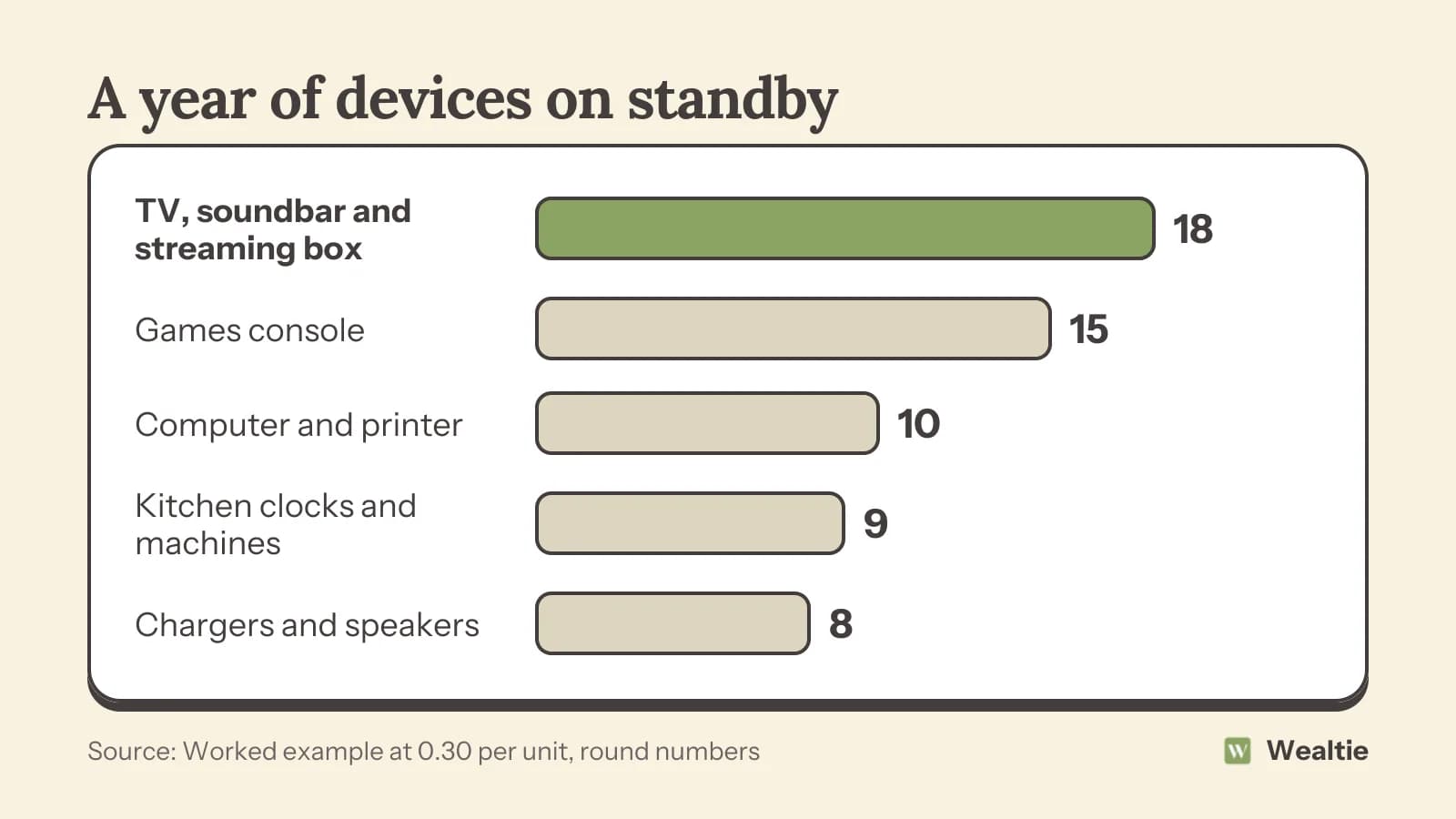
That's about 60 a year for doing nothing. It won't transform your budget, but it's money spent on devices you're not using, and cutting most of it takes very little effort. Newer devices usually use less on standby than older ones, so your total depends on what you own.
Which devices use the most on standby?
Games consoles
Consoles set to an "instant on" or rest mode can use much more power than those set to switch off fully. Changing the power setting in the menu is one of the easiest savings.
TVs and entertainment setups
TVs, soundbars, streaming boxes and set-top boxes left on standby together can add up. Some set-top boxes stay busy recording or updating.
Computers and printers
Desktop computers in sleep mode, monitors and printers left on all day use more than you'd expect.
Kitchen gadgets
Microwaves, ovens and coffee machines with clocks or displays draw a small amount all the time.
Chargers and smart speakers
Phone chargers left plugged in use very little, but smart speakers and other always-listening devices use a steady small amount.
How do you cut standby power cost?
Switch off at the wall
Turning devices off at the socket when you're not using them removes standby use completely. Extension leads with a single switch make this easy for a whole TV corner or desk.
Use eco or energy-saving modes
Many consoles, TVs and computers have power settings that switch off fully or use less power in standby. Check the settings menu.
Try smart plugs or timers
Smart plugs and timers can switch devices off overnight or when you're out. They cost a little upfront, so they make the most sense for devices with higher standby use. How to save money on your electric bill covers other ways to cut power use.
Unplug things you rarely use
Spare TVs, old speakers and gadgets you use once a month can stay unplugged until needed.
Replace very old devices carefully
Older devices can use much more on standby, but replacing something that works just to save standby power rarely pays off. Wait until it needs replacing anyway. Repair or replace covers how to decide.
What should you leave on?
Some devices should stay on. Fridges and freezers obviously need power, and routers, alarm systems, medical equipment and devices that need to update or record may need to stay on too. Boilers and heating controls often need power to work properly. If you're unsure, check the manual.
Is it worth the effort?
For many households, cutting standby use saves a modest amount each year with almost no effort, especially with an extension lead switch or a console setting change. It won't replace bigger savings like reducing heating use or switching tariffs, but it's one of the simplest habits to adopt. Over ten years, 60 a year adds up to 600. Cost per use is a useful way to think about which devices earn their place.
A good way to start is to walk around your home in the evening and look for little lights. Standby lights, glowing clocks and charging indicators show which devices are drawing power. Make a quick list, then decide which ones can be switched off at the wall overnight and which need to stay on. Most households find a handful of easy wins in the living room and home office.
If you want exact figures, a plug-in energy monitor shows how much a device uses on standby and when it's on. Some energy suppliers lend them out, and libraries sometimes have them to borrow. Seeing the numbers for your own devices can be more motivating than general advice, and it helps you focus on the ones that matter.
Getting the whole household involved helps too. Children often enjoy being in charge of switching things off at night, and a simple routine, like turning off the TV corner at the wall before bed, becomes automatic within a few weeks.
How can Wealtie help you track energy savings?
Add your electricity bill as a recurring transaction in Wealtie and log it in a utilities expense category. Comparing your bills over a few months shows whether small changes like cutting standby use are making a difference.
Questions people ask
Yes, a little. In a worked example, a household's devices on standby cost about 60 a year at 0.30 per unit.
Games consoles in instant-on mode, TV setups, computers and printers are often the biggest standby users.
Switch off at the wall, use eco power settings, try smart plugs or timers and unplug devices you rarely use.
Leave fridges, freezers, routers, alarms, heating controls and anything that needs to record or update switched on.
This article is general information, not financial, tax or legal advice. Your situation is your own; check the numbers that apply to you before you act on them.