Budgeting: The cost of a gaming PC: build, buy and running costs
The cost of a gaming PC depends on the games you want to play and whether you build or buy, plus a screen, accessories and games. In a worked example, a mid-range setup costs about 1,300.
 By Wealtie Team · 3 min read
Key takeaways
- The cost of a gaming PC depends on the games you play and whether you build or buy.
- In a worked example, a mid-range setup costs about 1,300.
- The graphics card is usually the biggest single cost.
- Building your own can save money, and second-hand parts save more.
What is the cost of a gaming PC?
A gaming PC can cost anything from a few hundred to several thousand, depending on the games you want to play and how good you want them to look. Simple indie games and older titles run on modest machines. The latest big releases at high settings need powerful, expensive parts. On top of the PC, you'll need a monitor, keyboard, mouse, headset and games. In a worked example, a mid-range setup costs about 1,300.
The best way to set a budget is to start from what you want to play. Check the recommended specifications for those games, then buy a machine that meets them, rather than the most powerful one you can find.
It also helps to think about how long you want the PC to last. Spending a little more on a few key parts can keep it running new games well for several years, while the cheapest option may need upgrading sooner. On the other hand, the very top parts cost far more for a small gain that many players never notice. The middle of the range usually gives the best value for the money, and leaves room in the budget for games and a decent monitor.
What does a gaming PC setup cost?
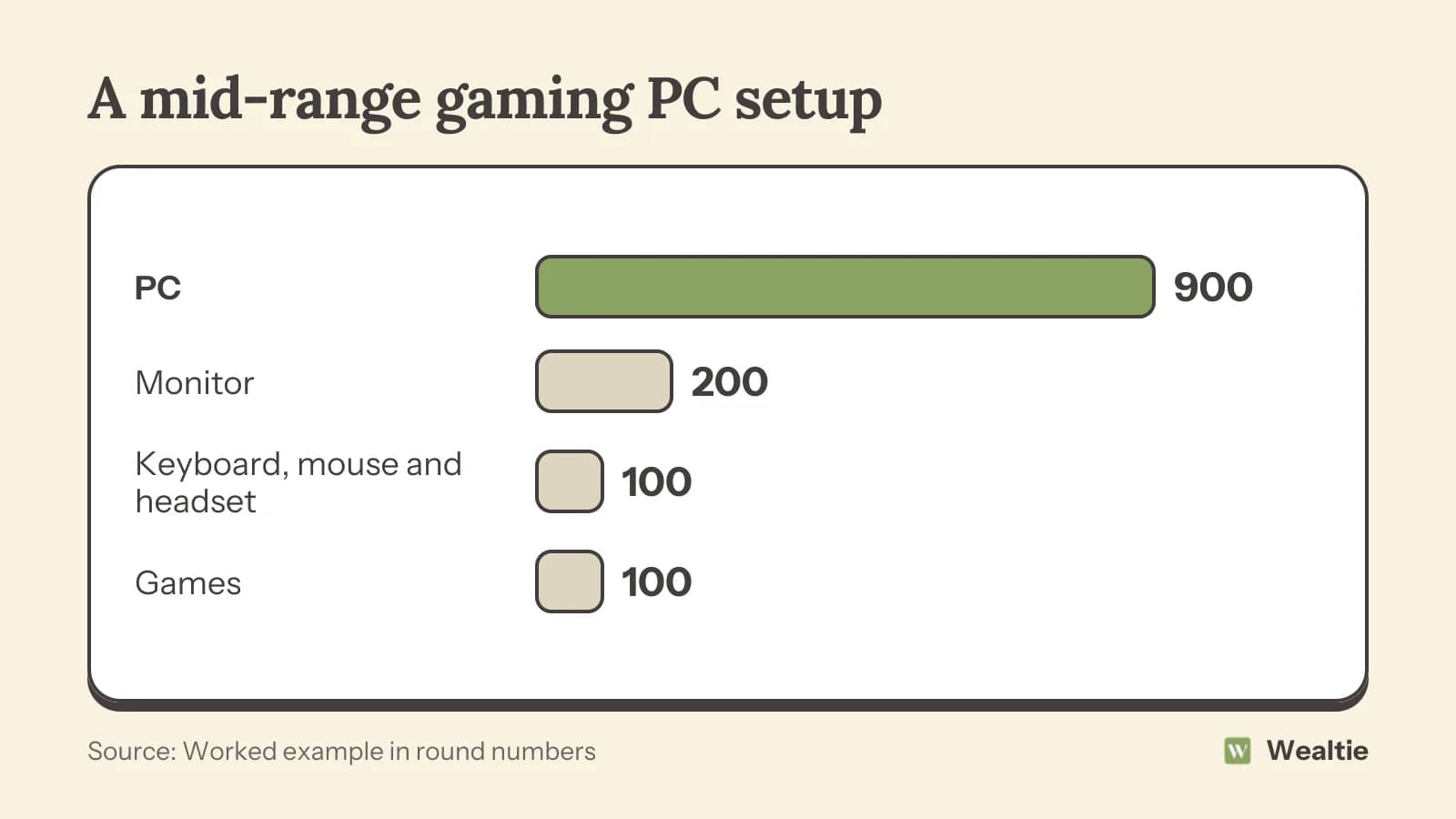
Here's a worked example of a mid-range setup, in round numbers that work in any currency:
| Item | Cost |
|---|---|
| PC | 900 |
| Monitor | 200 |
| Keyboard, mouse and headset | 100 |
| Games | 100 |
| Total | 1,300 |
If you already have a monitor and accessories, the cost drops to the PC and games alone.
Should you build or buy a gaming PC?
Building your own
Building a PC means buying each part and putting them together. It's often cheaper than buying a ready-made machine with the same parts, and you can choose exactly what goes in. It's also easier than many people expect, with plenty of free guides. The downside is that you handle any problems yourself.
Buying ready-made
A pre-built PC comes assembled and tested, with a warranty for the whole machine. It costs a little more, but saves time and worry. Deals during sales can make pre-built machines good value.
Second-hand
Used PCs and parts can be much cheaper. Check them carefully, ask how they were used and buy from sellers who allow returns where possible.
Which parts matter most?
The graphics card usually has the biggest effect on gaming performance and is often the most expensive part. The processor, memory and storage matter too, but spending more on the graphics card usually gives the best results for gaming. A good power supply keeps everything safe and stable, so don't choose the cheapest one.
Storage is another place to think carefully. A fast drive makes games load quickly, and games take up a lot of space, so it's worth getting enough from the start. Adding a second drive later is usually easy and cheap, which means you don't need to buy the largest size on day one.
What else adds to the cost of a gaming PC?
Games are an ongoing cost, especially new releases. Subscriptions for game libraries and online play add monthly costs. A gaming PC uses more electricity than a laptop, especially during long sessions. Upgrades are tempting: a new graphics card every couple of years can cost as much as the rest of the machine. Peripherals like a gaming chair, better headset or second monitor add up. How to budget for video games covers keeping game spending in check.
How can you get a gaming PC for less?
Choose parts that match the games you play, not the most powerful available. Build it yourself, or buy second-hand parts carefully. Wait for sales on games, and use free games and game library subscriptions instead of buying every new release. Upgrade parts one at a time when you need to, rather than replacing the whole PC. Keep your old monitor and accessories if they still work. How to save money on electronics has more tips.
Save up rather than borrow
A gaming PC is a big purchase, and paying with credit adds interest. Setting aside a fixed amount each month until you have enough avoids debt. How to save for a big purchase covers how. Work out the cost per use: a PC used for hours every week for years can be good value.
How do you track gaming costs in Wealtie?
Add a gaming category to your expense categories and set a budget for games, subscriptions and upgrades, so you can see what the hobby costs over a year.
Questions people ask
In a worked example, a mid-range setup with a PC, monitor, accessories and a few games costs about 1,300.
Building is often cheaper for the same parts, while buying ready-made saves time and includes a warranty for the whole machine.
The graphics card usually has the biggest effect on gaming performance and is often the most expensive part.
Match parts to the games you play, build it yourself, buy second-hand carefully and upgrade one part at a time.
This article is general information, not financial, tax or legal advice. Your situation is your own; check the numbers that apply to you before you act on them.