Using Wealtie: How to set up a budget in Wealtie, step by step
To set up a budget in Wealtie, open the Budget tab, tap Set Budget Goals, enter one total for the month and, if you like, give a few categories their own share of it. The harder part is the number, so most of this guide is about that, and about reading Budget Health once the month is running.
 By Wealtie Team · 4 min read
Key takeaways
- A Wealtie budget is one total for the period, and every expense you log counts against it, rent included.
- Transfers between your own accounts never count as spending, so money moved to savings doesn't touch the budget.
- Splitting the budget by category is optional; split out the two or three categories that tend to run over and leave the rest unallocated.
- Budget Health projects your spending pace to the end of the period: spent so far ÷ days gone × days in the period.
- A monthly budget is free; on Pro the same budget can run daily, weekly, quarterly or yearly.
What counts against your Wealtie budget?
Every expense you log in the period counts, whichever account or category it's in. A Wealtie budget is one number to stay under for the month, and the bill you pay from your card, the coffee you pay in cash and the rent that leaves on the 1st all move it.
Two things don't count:
- Transfers between your own accounts. Moving 600 from your current account to savings is recorded as a transfer, not spending, so it never touches the budget. That's how savings stay out of the limit (more on accounts and transfers).
- Income. Money coming in counts toward the separate income goal, which has its own amount and its own streak.
So the budget is everything you spend in a month. Set the number with that in mind.
How much should the budget be?
Start with take-home pay and subtract what you want to save that month; what's left is the budget. On 3,000 a month with 600 going to savings, the budget is 2,400. The example uses round numbers that work in any currency.
| Amount | |
|---|---|
| Take-home pay | 3,000 |
| Moved to savings (a transfer, not spending) | 600 |
| Monthly budget | 2,400 |
That 80/20 split is the 50/30/20 rule with needs and wants added together. The budget calculator does the sum for your own pay.
If you've already logged a month, the monthly spending overview shows what that month came to. Use it as a check: if last month was 2,600 and you set 2,400, you're asking for 200 less, and it helps to know where that 200 will come from before the month starts. If you're building a budget from nothing, how to make a budget walks through the five steps first.
How to set up a budget in Wealtie
It's one form with four fields, and only the amount needs thought.
- Open the Budget tab. With no budget yet, a card reads No budget yet. Tap it.
- On the Budget Goal screen, tap Set Budget Goals.
- Budget Name: anything you'll recognise. Leave it empty and it's called My Budget.
- Total Amount: the number from the last section, 2,400 in the example.
- Budget Period: Monthly. The other periods are on Pro.
- Category Allocations: optional. Tap + Add Category for each category you want to give its own share, or skip it.
- Tap Create Budget.
Once it's saved, the Budget tab shows the total spent against the limit. Log expenses as they happen and it keeps up.
Should you split the budget by category?
Split out the two or three categories that tend to run over, and leave everything else in the unallocated remainder. Each share fills on its own, and only one that's past its limit turns red, so a split shows which part of the budget is moving fastest.
| Category | Share of the 2,400 |
|---|---|
| Groceries | 400 |
| Eating out | 150 |
| Transport | 150 |
| Unallocated (rent and everything else) | 1,700 |
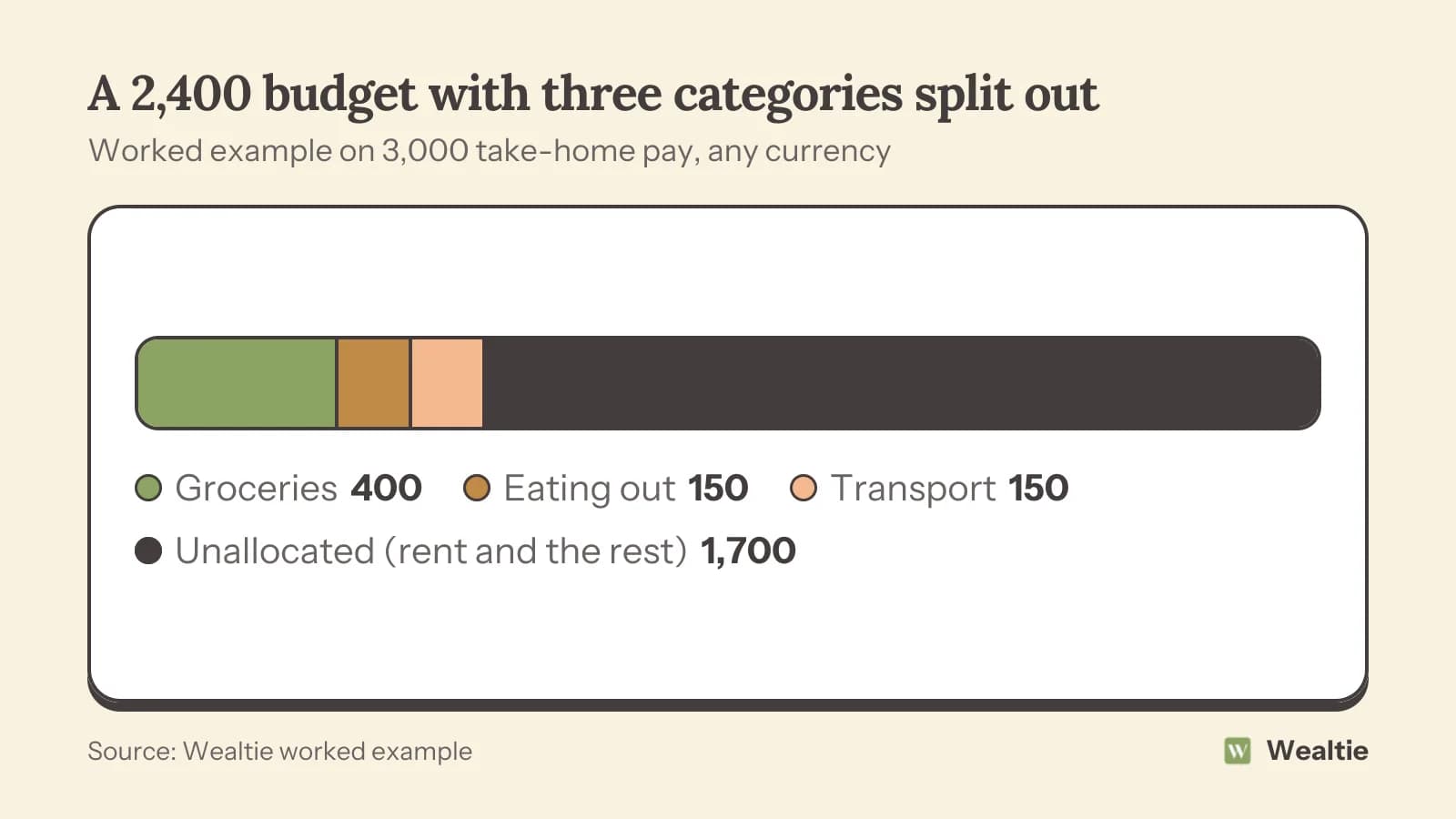
The shares can't add up to more than the total; the form refuses to save if they do. Rent doesn't need a share of its own. It's the same every month, and a share for it would only ever read full.
The Free plan has 10 categories, which is enough for a split like this one. Pro adds unlimited expense categories, nested up to four levels.
What does Budget Health tell you once it's running?
Budget Health tells you where your current spending pace ends, while there's still time to change it. It takes what you've spent, divides it by the days gone, and multiplies by the days in the period.
On a 2,400 budget, halfway through a 30-day month with 1,300 spent:
| Step | Sum | Result |
|---|---|---|
| Daily pace so far | 1,300 ÷ 15 | about 87 a day |
| Projected for the month | 87 × 30 | 2,600 |
| Projected overage | 2,600 − 2,400 | 200, about 8% |
That shows as Projected to exceed budget by 8%. To finish on 2,400, the remaining 1,100 has to last 15 days: about 73 a day instead of 87. The payday forecast calculator runs the same sum outside the app.
The score, the days left and both streak counts sit under the Budget Health banner. More on how the forecast works is on the budget tracker page.
How do you change or delete the budget?
Tap Edit on the Budget Goal screen, change the amount or the split, and choose when it applies. The Update current period switch decides that: off, the change starts with the next period and this one runs to its end unchanged; on, it applies to the current period straight away.
Editing doesn't touch the streak. Deleting does: it removes the budget and every past period with it, resets the current streak to 0 and keeps your best streak on record. If the number is wrong, edit it rather than starting over. The streak is how Wealtie turns a kept budget into a budgeting habit.
Can the budget run weekly or yearly instead?
On Pro, yes: the budget can run daily, weekly, monthly, quarterly or yearly, and Budget Health, the history and the streak all count in that period. On Free, the budget is monthly.
A weekly budget suits people paid every week or two, who'd rather check against a smaller number more often. You still have one budget at a time; changing its period through Edit follows the same switch as changing the amount.
Everything in this guide other than the other periods works on Free. The budget app page has the full Free and Pro list.
Questions people ask
Yes, a monthly budget is free, along with Budget Health, the category split, the history and the streak. Pro is only needed to run the budget daily, weekly, quarterly or yearly instead of monthly.
Yes, every expense you log in the period counts, rent included. Set the budget as everything you expect to spend in the month, and expect Budget Health to read high in the days after a large payment like rent.
No, you have one budget and one income goal, each with its own amount, period and streak. Inside the budget you can give categories their own share of the limit, which covers most of what separate budgets would do.
No, a transfer between your own accounts isn't spending, so it never counts against the budget. Moving money to savings is how you keep it out of the limit.
The period closes over budget and the streak goes back to 0; there's no other penalty. Your best streak stays on record, and the next period starts with the same budget.
Sources
- Budget tracker app with spending forecasts (Budgets and income goals) · Wealtie · checked 17 October 2026
- Wealtie product facts (llms.txt) · Wealtie · checked 17 October 2026
This article is general information, not financial, tax or legal advice. Your situation is your own; check the numbers that apply to you before you act on them.