Using Wealtie: How to track cash spending the same way as your card
To track cash spending, treat your wallet as an account: an ATM withdrawal is a transfer into it, not spending, and each cash purchase is logged from it as it happens. Once a week, count the cash and compare it with the wallet's balance; the difference is spending you forgot.
 By Wealtie Team · 3 min read
Key takeaways
- Cash spending disappears from a budget when the ATM withdrawal is counted as the spending; the withdrawal only moves money from your bank to your wallet.
- Treat your wallet as its own account and log an ATM withdrawal as a transfer into it.
- Log each cash purchase from the wallet account, ideally at the till or the same evening.
- Once a week, count the cash and compare it with the wallet's balance in your app; the gap is spending you forgot to log.
- Apps that read your bank can't see cash; tracking it by hand is the only way it shows up in your categories.
How do you track cash spending?
Treat your wallet as an account. Money goes into it from the ATM, and each cash purchase comes out of it. Log both, and cash shows up in your budget like everything else.
Cash is where most budgets leak, because it's usually tracked wrong. The ATM withdrawal shows up on your bank statement as one big expense, "Cash 100", and then the coffee, the market stall and the taxi it paid for never appear anywhere. The month's spending looks right in total, but nobody can say where the 100 went.
Is an ATM withdrawal spending?
No. It moves money from your bank account to your wallet. Your total money is the same before and after.
The spending happens later, when you hand the cash over. Counting the withdrawal as spending is like counting a transfer to savings as spending: the total's right, the picture's wrong. Log the withdrawal as a transfer between two of your own accounts, and log the purchases as the expenses.
How do you set up cash tracking?
Three steps, once:
- Add a cash account next to your bank account and card, with the cash you have now as its starting balance.
- Log every ATM withdrawal as a transfer from your bank account to the cash account.
- Log every cash purchase from the cash account, with a category, like any card purchase.
That's it. Your bank account's balance stays right, your cash account's balance shows what should be in your wallet, and your categories include what the cash was spent on.
What does it look like in a normal week?
Here's a worked example in round numbers, the same in any currency.
| Day | What happened | Cash account |
|---|---|---|
| Monday | Withdrew 100 from the bank (transfer) | 100 |
| Tuesday | Coffee and pastry, 12 (eating out) | 88 |
| Thursday | Market vegetables, 8 (groceries) | 80 |
| Saturday | Taxi home, 35 (transport) | 45 |
| Sunday | Counted the wallet: 20 | 20 |
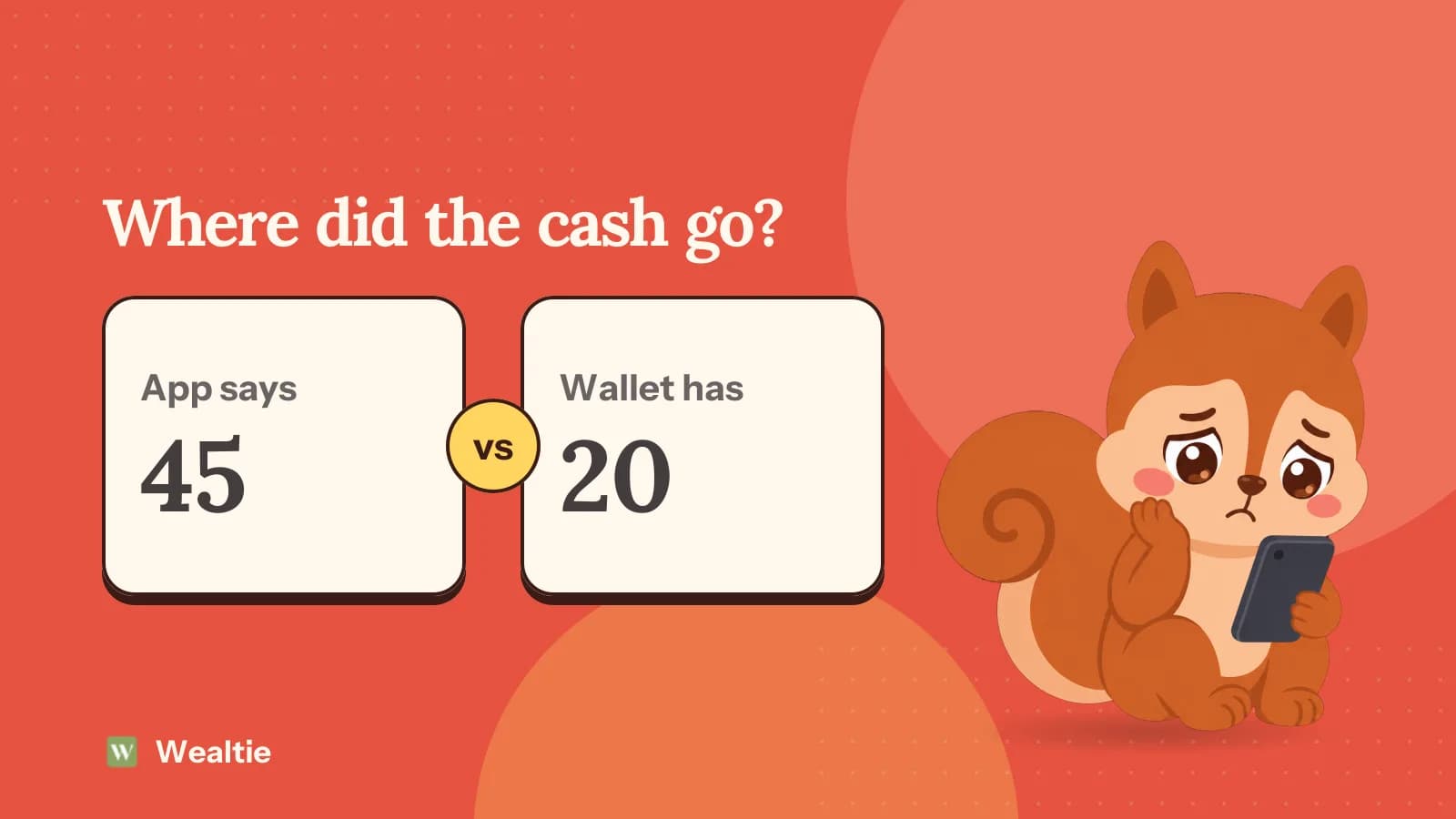
The app says 45 should be in the wallet; the wallet holds 20. That gap of 25 is spending that wasn't logged. Maybe it was lunch, maybe parking. Log it as best you can remember, or as uncategorised cash, so the balance matches again.
How do you remember to log cash?
Log at the till, or the same evening at the latest. Waiting for the end of the week means guessing.
- Put the app on your home screen or use a widget, so logging is a tap, not a search.
- Keep receipts in one pocket of your wallet and clear it every evening.
- Count the wallet every Sunday and log the gap. It takes a minute and catches everything else.
The weekly count is the safety net. Even if you forget half the purchases, the gap is logged, and the cash total stays right.
Should you use cash to stick to a budget?
For the categories where card spending runs away, it can help. An empty wallet is a hard limit in a way a card isn't. Some people withdraw a week's eating-out money on Monday and stop when it's gone.
Track it the same way, though, or the budget loses sight of it. The weekly withdrawal is a transfer, the purchases are the spending, and the category totals still add up at the end of the month. How to stop overspending covers the other habits that help in the categories that leak.
Why can't budget apps that connect to your bank see cash?
Because the bank doesn't know what you did with the cash. It saw the withdrawal, and that's the last record it has.
That's why apps that sync with your bank show cash as one lump. The only way cash spending appears in your groceries, eating out or transport categories is to log it by hand. For people who use a lot of cash, an app built around logging works better than one built around a bank feed.
How does Wealtie handle cash?
The same way as a card. Wealtie never connects to your bank, so every purchase is logged by you in a few taps, and cash is tracked exactly like a card payment.
On the Free plan, add your bank account and a cash account (two accounts are included), and both show in one net worth total. Log ATM withdrawals as transfers between them, and transfers aren't counted as spending. Cash purchases go into the same categories as card purchases, so your monthly budget and Budget Health include them. If you haven't set up the budget yet, how to set up a budget in Wealtie walks through it, and more on logging without a bank connection is on the expense tracker page.
Questions people ask
Treat your wallet as an account. Log ATM withdrawals as transfers into it, log each cash purchase from it with a category, and count the cash once a week to catch anything you missed.
No. It moves money from your bank account to your wallet; your total doesn't change. The expense happens when you spend the cash. Counting the withdrawal as spending hides where the cash went.
Apps that connect to your bank only see the ATM withdrawal, not what you bought with the cash. To see cash in your categories, the purchases have to be logged by hand.
The weekly count catches it. If the wallet holds 40 and the app says 65, 25 went somewhere. Log it as best you can remember, or as uncategorised cash, and carry on.
It helps for categories where card spending runs away, like eating out, because an empty wallet is a hard limit. Track it the same way, so the categories still add up.
This article is general information, not financial, tax or legal advice. Your situation is your own; check the numbers that apply to you before you act on them.