Budgeting: How much to spend on a laptop for studying
How much to spend on a laptop for studying depends on your course, but most students need a reliable mid-range machine rather than the most powerful. In a worked example, a 500 laptop that lasts three years costs about 170 a year, while a refurbished one can cost even less.
 By Wealtie Team · 3 min read
Key takeaways
- How much to spend on a laptop for studying depends on your course; most students need mid-range.
- In a worked example, a 500 laptop lasting three years costs about 170 a year.
- Check your course's software requirements before buying.
- Student discounts and refurbished laptops can save a lot.
How much to spend on a laptop for studying
Enough for a reliable machine that runs what your course needs, and usually no more. A laptop is often one of the biggest single costs at the start of a course, so it's worth taking time to choose well rather than buying the first one on offer. For most students, that means a mid-range laptop. Courses that use specialist software, like design, video, engineering or data work, may need more power, while essay-based courses often need very little. Buying more than you need is one of the easiest ways to overspend before term starts. Talking to students already on your course is a quick way to find out what works.
How do the options compare?
Here's a worked example of the cost per year over a three-year course, in round numbers that work in any currency:
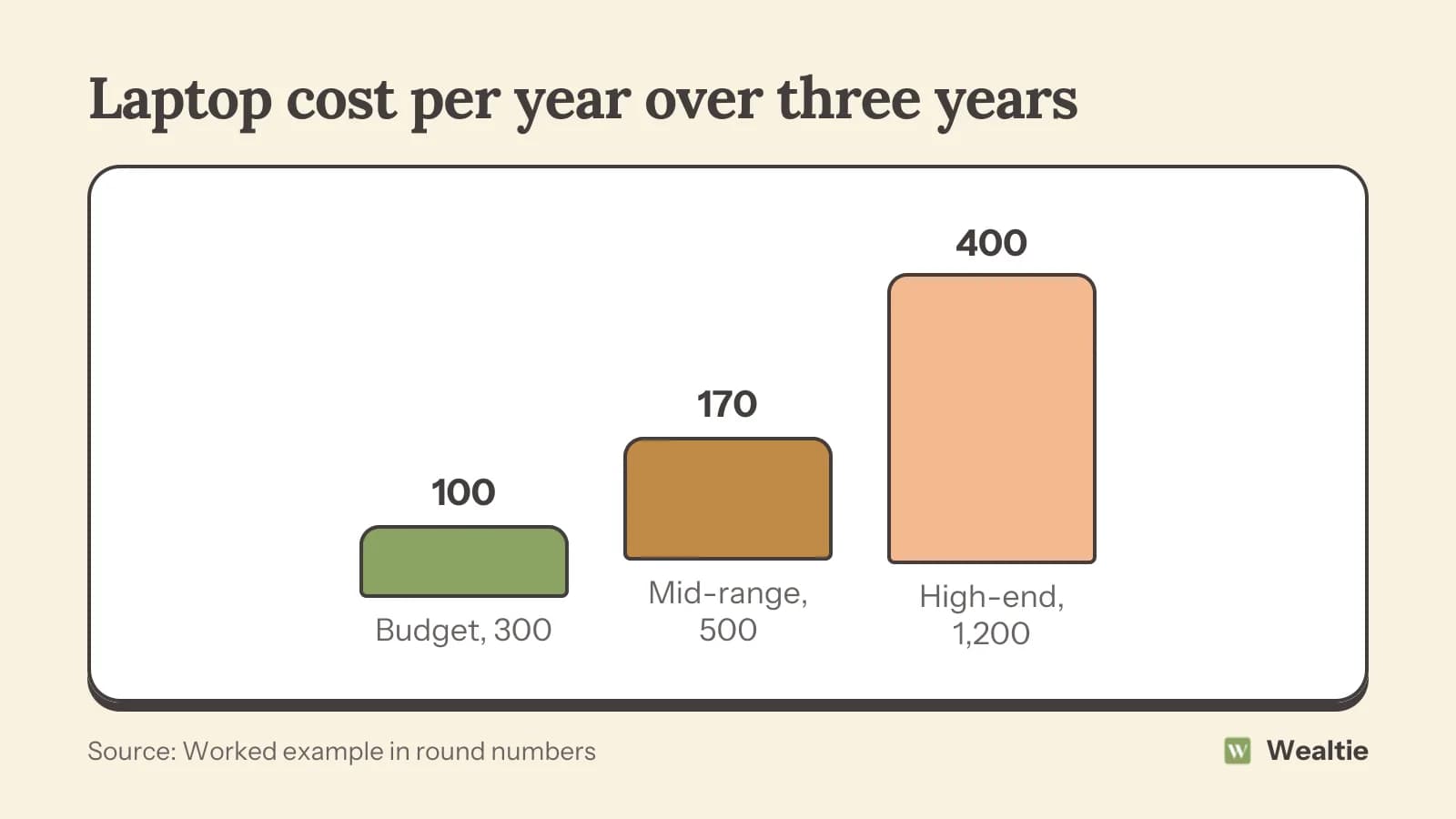
A 300 budget laptop costs about 100 a year, a 500 mid-range one about 170, and a 1,200 high-end one about 400. If the budget laptop struggles or fails early, it can end up costing more. If the high-end one has power you never use, it's money wasted. Your own choice depends on your course and how you work. Thinking about how long you need it to last, including any postgraduate study, helps you choose.
What do you need?
Check your course's requirements first. Many universities and colleges publish recommended specifications, especially for courses that use specialist software. Ask the department if you're unsure. Some courses provide powerful computers in labs, so your own laptop only needs to handle everyday work. For general study, look for:
- A comfortable keyboard and screen for long writing sessions
- Good battery life for working in lectures and libraries
- Enough storage, or plan to use cloud storage provided by your institution
- A weight you're happy carrying every day
- Reliable build quality and a decent warranty
Software is often free
Many institutions provide software, like office suites, free to students. Check before paying for any software yourself. Free alternatives exist for many paid programs, which work well for most coursework.
Where can you save?
- Student discounts: many manufacturers and retailers offer them, especially before term starts
- Refurbished laptops: often much cheaper, with a warranty
- Last year's models: usually discounted when new ones arrive
- Institution schemes: some universities offer discounted laptops or loans
- Hardship funds: some institutions help students who can't afford equipment
How to save money on electronics covers buying at the right time. Avoid buy-now-pay-later deals unless you're sure you can make every payment on time.
Should you buy refurbished?
It's often a great choice. A refurbished laptop from a reputable seller, with a warranty, can cost much less than new and work just as well for study. Check the battery health, the warranty length and the returns period. Avoid very old models that may not get software updates. A refurbished business laptop can be especially sturdy and good value.
How do you make the laptop last?
Use a protective case or sleeve, keep it away from drinks and avoid leaving it in hot places. Back up your work regularly, since losing coursework can be far more costly than a broken laptop. Check whether your home or contents insurance covers your laptop away from home, or consider separate cover. A lost or stolen laptop near exams is stressful enough without the cost.
Library and campus computers
Many campuses have computers and printers available to students. If money is tight, they can bridge the gap until you can afford a laptop, or reduce how powerful yours needs to be.
Accessories you may need
A mouse, a laptop stand and headphones can make long study sessions more comfortable, but they're not essential on day one. Buy them as you find you need them, and look for student discounts or second-hand options first.
How does a laptop fit your student budget?
Plan for it alongside other start-of-course costs, like books, accommodation deposits and travel. The college student budget covers the full picture, and how to save money on books helps with another big cost.
Check what your university offers before buying. Many have discounts with manufacturers, loan schemes or computer rooms you can use, which can mean a cheaper laptop is all you need.
How do you track study costs in Wealtie?
Give study costs, like your laptop, books and software, their own line in your expense categories, so you can see what your course costs. A monthly limit in the budget tracker helps you balance big purchases with everyday spending.
Questions people ask
Most students need a reliable mid-range laptop. In a worked example, a 500 laptop costs about 170 a year over three years.
Check your course's published requirements, especially if it uses specialist software.
Often, yes. Buy from a reputable seller with a warranty and check the battery health.
Many manufacturers and retailers offer student discounts, especially before term starts.
This article is general information, not financial, tax or legal advice. Your situation is your own; check the numbers that apply to you before you act on them.